Grokking “style”

Recently while interviewing a visual designer candidate at our office, I asked if he could just briefly articulate the stylistic differences among his samples of icons & graphics–their qualities and attributes, the overall aesthetic character, themes, and motifs. He had quite some difficulty verbalizing this, which was unfortunate. For if you’re going to be a successful designer on a design team, you’ve got to be able to explain your design choices, especially visual styles, with clear defensible, and meaningful reasoning. I believe this is true for visual designers and UI or interaction designers as well. (see my earlier posts about emerging hybrids of visual and interaction)

Indeed, to be a successful, effective designer (and leader) shaping a new product design, it’s necessary to be able to do these three things in terms of “style”:

1. Observe: Must develop and have a certain aesthetic sensitivity for observing and truly paying attention to, what’s around you across diverse media, both physical and digital forms. Do you notice the nuances, subtleties, nooks & crannies…the textures, lighting, patterns, forms, colors? How they vary across contexts or form factors (i.e., from phone to tablet to desktop to HDTV). Having an eye for detail at an intuitive level of sensing, honed by years of practice and rigorous experience, is immensely valuable.

2. Articulate: Are you able to explain the defining characteristics, qualities, attributes, and deeper values suggestive of such styles, beyond generic non-phrases like “it’s cool” or “it’s clean”. What does that style mean, how does it impact perceived functionality, usability, value, etc. How does the style convey a personality, a tone of voice, an attitude for how the user should approach the product?

3. Create: And finally creating a distinct visual design language and coherent, flexible system accordingly, blending ideas and attitudes from a range of sources: the past, the present, and cross-disciplinary fields (biology, fine arts, engineering, theater, etc.), anticipating what’s next.

A visual style is a visceral argument of how one should live their life, a declaration of certain values advocated (with other values dismissed or ignored). It’s a projection of tone, quality, mood. A reflection of the product’s personality, tone of voice conveyed into the ambiguous space of marketing / communication / interpretation. A style speaks to the mood of the times (zeitgeist), reflecting the social & cultural vibe at the moment, while anticipating what’s on the horizon, deftly echoing emerging trends and tastes.

If you’re going to be a strong, effective designer worthy of shaping and improving “the human condition”, as UX professionals are often self-described to do, grokking “style” is a vital element of that noble pursuit.


Notes: Thomas Vander Wal on Beyond Simple Social

Recently I attended this thoroughly informative talk sponsored by Salesforce UX at their offices in SF Downtown, led by Thomas Vander Wal, a social platform strategist. Thomas, by his own account has been on the social scene since 1996, including a longtime community manager for a CompuServe forum for lawyers. His professional career trajectory has included three major turns of “social” in digital media: Groupware (1990s), Knowledge Management (1990s-2000s), and current Web 2.0 Social (mid-2000s). Below are my key takeaways…Enjoy!

(Here are the slides posted on SlideShare: http://www.slideshare.net/vanderwal/beyond-simple-social-presented-at-salesforce )

* What’s more fascinating than “Likes” and “tweets” are the algorithms that drive social connections and interfaces: the social science, the analytics, what it all means for a company and the individual.

* Again, beyond the “simple social” of likes/tweets, consider the structured symbolism and cultural valence of an activity like the archetypal Tea Ceremony, as a social exercise that has history, context, utility, and meaning for the participants and observers. That’s truly “being social”.

* When evaluating a social situation (in real life or digital medium), consider these 5 questions about what’s impact the social-ness of the moment: Is it the person? Is it how the people are being social in that moment? Is it cross-cultural influences? Is it organizational constraints? (public vs private, govt agencies, etc.) Is there some issue/quality of the service or tool being used for the social encounter?

* In a social encounter, there are “social scripts” that we either intuitively follow or learned to follow. Based upon observation, interaction, interpretation, etc. Guides our reluctance or eagerness to engage with others.

* Beyond “trust”, consider the notion of “social comfort”— how are people comfortable with a) people, b) tools, and c) content towards enacting social relationships.

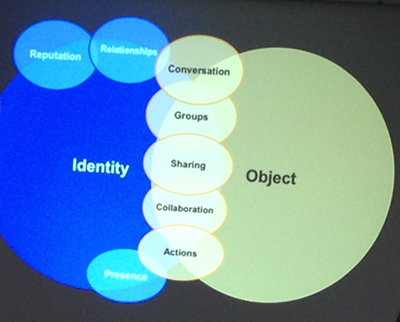
* Elements of Social Software: Wonderful diagram illustrating the relationship amongst social objects, personal identity and the various elements that go into a social product, from artifacts to actions to higher-order elements like conversations and collaborations

social_vanderwal.png

* Social perspectives: In any social interaction and software situation there are multiple perspectives at play that warrant attention – Personal – Collective – Community/Groups/Teams – Collaborations – Newbie – Service Owner – External Developer

* Social progressions: There’s an evolution of social interactions from small to large – Spark: something that is sent out, posted, liked, tweeted, to get attention going – Campfire: a small community, comfortable space, maybe temporary, then dies out – Bonfire: more conversation, interaction, followers/joiners, distributed and spreads – Torch: what to strive for, a controlled focus that guides, directs, easy for people to participants to “be around” and engage, dims and glows accordingly, etc.

* Gotta think about striking a balance of social objects/conversations vs social participants, what’s the ideal trajectory to keep people engaged, interacting, conversing/sharing, but not out of controls (burdensome) or ghost town (minimal participation)

* These thoughts help one develop and create a mature social tool that becomes a complex, sophisticated social system, not just the “simple social” of current social apps. Enriching the social fabric of an organization, etc.

Some initial thoughts on Metro

Recently I got my hands on the Nokia Lumia 900 running Windows Phone with the Metro UI. Also, through internal channels at Citrix, I got a fairly deep one-day primer on designing for Metro via MSFT evangelist-led seminar and related team-based workshops afterwards. So, I’m certainly ramping up on my Metro IQ! Lots to discover, interpret, and apply. Those devs and designers unfamiliar should not naively presume Metro is simply “flat icons” and “big boxes”…there’s quite a well-thought out and clearly defined system for maximum visual and behavioral coherence across multiple screen and device formats (Small, medium, large). Big kudos to MSFT for pulling this off. According to the evangelist I heard, this is the first time in MSFT history to attempt and achieve such a broad-based UI coalescence across multiple business units and devices at nearly the same time. Wow!

The following links offer valuable info straight from MSFT on designing for Metro; definitely worth spending some time studying and re-visiting:

> Case Study of iPad to Win8 Metro

> UX Guidelines for Metro style apps

> UI Patterns for Metro style apps

> Metro design principles


And also slides/talks by Mike Kruzeniski, former Creative Director at MSFT who led the Metro design effort, explaining the rationale and inspirations–highly rec watching!

YouTube video of talk:
Slideshare slides:


For now, I just wanted to share some of my own personal thoughts on Windows Metro, as I’ve experienced it thus far on a phone device (not yet tablet). I also have experienced the recent Metro variant for XBOX 360, which is qualitatively different being as a large-screen, 10 foot entertainment experience.

Metro is, as many others have noted publicly, a refreshingly bold vivid sharp crisply defined novel visual design system and language that successfully avoids yet another “me too” iteration of Apple’s iOS visual style (sorry Android and WebOS, although each has their own, er, charms as well ;-) Again, kudos for pushing a different angle on UI style. The typography is stunning and clear. The panoramic parallax imagery/motion is gorgeously compelling. The semantic zoom (for tablet only now) is slick and smart. The live tiles are interesting, supporting a glanceable UI.

So, after about 6 weeks of varying usage (along with my iPhone and iPad and Kindle Fire ;-), here’s my following observations:

– As Matt Gemmell noted, Metro embodies a strong tone of “information asceticism”: pure starkness of content. Some say content first is great, kill the chrome. Yet I feel it’s so content first that I’ve become lost inside an info graphic, losing my anchors for navigation, at times.

– The “live tiles” makes for a very visually compelling dashboard yet it’s not quite as useful as I’d thought. With iOS Notifications I know immediately the sender and content of emails. With Metro I only know that I got 4 new messages, but no idea of urgency, sender, context, content, etc. Perhaps something to improve?

– The Application list is one long vertically scrolling list of names…Maybe not the best effective or efficient use of the real estate? Why not app icons in a grid? Or rolodex of cards? Hmm.

– Is there too much typography?? I love the direction as said above, but there’s quite a bit to read, just a pinch more cognitive load and processing, I think ;-) Perhaps needs more finessing with the spacing and introducing more visual elements to break up the textuality of text. In some cases I wonder if the type is simply too large and dominant.

– Flat icons fit the overall ascetic aesthetic overall, but becomes somewhat cryptic at times. Of course you can tap the ellipse to get a gentle bump that shows the text labels underneath. But how can we avoid that?

– Love the quirky, whimsical little movements and animations on taps and holds and actions. Some may find them gratuitous (like the emails being sent out or photos sliding laterally across panoramic panes) but again, adds delightful, useful feedback. Also gives the info space a “feel” that’s reactive and alive. Not just static elements but “digitally tangible” in a sense. This makes the interface come alive truly.

– Overall flatness of the space and basic color scheme leaves much to be desired IMHO. As someone who likes texture and yes some skeumorphic elements gracefully done well, there’s a stark monotony to the space that leaves me feeling empty, wanting more…character? identity? soul? Hmm.

– The fluidity and speed overall is wonderful, just as immediately responsive, if not more than, iOS on iPhone. Definitely feels slick and powerful and useable. No issues there!

– Same problem as with Android…the damn physical hard key back button on the device! Argh. As an iOS user it’s very hard to remember that key as the perpetual “get me out” button. Keep wanting to tap out some gesture or tap a dedicated soft navi button.

These are just a few initial thoughts…will keep building on as I continue exploring Metro on other devices as well. But overall a positive fresh direction, with great potential. Eager to see how it evolves further, particularly for desktop and tablet contexts.


A day in the life…

I saw this answer on Quora describing the “day in the life” of a product designer at Quora, which got me thinking, so what is it that I do on a typical daily basis? How would I answer that question given my current job duties and tasks and goals? And how would that change if I were to change positions or employers? OK, that last one may be a bit harder to answer (perhaps worthy of a separate post entirely ;-) but below is my own quickly drafted attempt at articulating “A day in the life of a principal designer” at Citrix. In general it’s really a composite picture encompassing several various days recently, but you get the point.

————-

– Have early AM web conf call (using GoToMeeting HD Faces) with remote dev team on project progress: status of prototype development, UI design iterations, issues/concerns/questions, etc. Identify core issues, flag follow-ups, reply diplomatically to criticisms and raise counter-points respectfully.

– Update notes and action items afterwards via email and/or twiki as appropriate

– Answer emails missed during the call.

– Check Twitter and Facebook. Retweet or like/share accordingly.

– Send out emails to people for events coordination (speaker series, summits, workshops), verify scheduling with team exec admin and reserve venues/resources as needed.

– Check Twitter and Facebook. Retweet or like/share accordingly.

– Sketch ideas for product concept in my notebook. Move to studio to explore on whiteboard. Gaze out at mountains in the distance, daydream and sketch and ruminate on new possibilities.

– Lunch break with team. Maybe Pho or Indian or Sushi, as warranted per collective appetites.

– Return to design space, wander around, visiting various designers and directors. Ask about projects. Explain what I’m working on, Identify touch points if any, flag any follow-ups.

– Answer emails missed during lunch.

– Check Twitter and Facebook. Retweet or like/share accordingly.

– Translate sketch ideas into Fireworks for digital production. Consider them hi fidelity wireframes or rough visual concepts. Interrupted a couple of times. Got Twitter and Facebook running on second monitor. Concurrently (ha!) updating statues and digital design files.

– Check-in with another project team. Offer inputs and offer to respond/create deliverables. Thinking of pulling in my boss for some executive maneuvering and reinforcement. Hmm.

– Check Twitter and Facebook. Retweet or like/share accordingly.

– Munch on an apple while walking around the studio area, visiting with designers. Noticed a group struggling with a concept, I hover and suggest ideas. On my merry way back to my desk.

– Sit at the Mad Men couches and sketch ideas for new concept, and/or articles and conference talks while listening to Spotify on my Beats headphones. Great place for thinking and writing! Also for people-watching with all the foot traffic passing by. Chance to say Hi to folks haven’t seen in awhile. Build social relationships.

– Get emails from non-supported teams wanting Office Hours support. Scheduled for next slot. Shoot email to colleagues requesting their participation in Office Hours to help figure out support, etc.

– Receive a head’s up about upcoming design workshop needing my help and/or facilitating direction. Make mental note to refer to previous workshop methods/plans and adjust as needed per project team. Need to schedule a “prelim” call to assess the project needs.

– Meet with team on drafting a conference proposal about latest UI design approach, success, lessons learned. Identify venues to shop the proposal around.

– Text from boss about possible “firedrill” needing me to stand-by for possible deployment on this project. We like to refer to this as “Navy Seal” design work, informally. Rapid expert design! Great times to dive and thrive.

– Check Twitter and Facebook. Retweet or like/share accordingly.

– Time to head home…possibly #nightshift activity per the day’s projects and looming deadlines or conf calls demanding to see fast results. The cycle continues! Never know what the day shall bring ;-) Gotta be adaptive!

Learning from TED

I was fortunate to have attended the fantastic TEDxStanford event the other day (videos to be posted soon). It was my first time attending any TED event (although I’ve viewed various TED talks online) and it was even more impressive, inspiring, thought-provoking, creative, energizing than expected. There’s something about “being there” live that made it quite impactful, all of the short 15-20 minute talks and performances, nicely “lighting up different parts of the brain”, as the host described.

Also it got me wondering just what is that makes a TED talk so memorable and special? What’s that secret sauce (and primary ingredients) that we could adapt into our own presentations at work? Based upon my own personal recollection and experience, here are my quick takeaways:

– There is a vivid, powerful, personal emotional connection to the topic…such as a family member, close personal friend, or even yourself as the ultimate protagonist who suffered severe trials yet overcame them to achieve a more enriched, positive outlook on life.

– A strong sense of storytelling, not just fact-conveying. While many speakers had Powerpoint slides, and some were even quite dense or visually just ugly, they didn’t detract because the speaker was telling a vivid, authentic story that moved the audience.

– Use of familiar analogies or metaphors to relay and distill highly complex ideas. Of note was one speaker describing his methods of investigating cancers via novel molecular cell technologies. He used the metaphor of “molecular spies” using “walkie-talkies” to send reverse signals about possible cancerous developments in the body. Such familiar phrases made the concept approachable but also the speaker seemed more genuine and casually “down-to-earth”, despite being a truly brilliant PhD scholar.

– Lots of imagery, from the shocking and disturbing (like various physical medical disorders) to the hilarious and wonderful (like self-parodying images or videos). Minimal text and more visual and auditory stimulation.

– Very well polished, rehearsed, practiced, and researched talks. How many times did these speakers say “umm” ? Not much if at all. It truly seemed they were speaking from their heart or mind, authentically, not just trying to verbalize memorized lines. There’s a certain embodiment of the message that makes conveyance very real and meaningful. As EM Forster said, “only connect”, and indeed the best TED speakers do just that at a very profound level.

– Every talk compelled me to think about my relationship to my friends, family, and world in a different way. There was some appeal either explicit or implicit to affect change in the world for the better, either through specific action or critical thought about mundane issues.


Â