
MS Project != design happiness

I was having lunch today with a former Adobe design manager at House of Kabobs in Sunnyvale (I highly recommend it!) and we wandered onto the topic of UI schedules and MS Project in particular. I’m just not a fan of MS Project: it’s bloated, ugly, tedious, heavy, bespeaks of micromanagement and bureaucracy (death by Powerpoint? how about waterboarding by Project!). But there’s something else irksome about it and until today I just didn’t know how to express it. But my friend said it just right: “MS Project is meant for deterministic projects, where you already know the result.” He’s right–If you already know what you’re going to build, then it’s just a matter of “construction”, getting the materials and resources and time to build the damn thing. And all that can be neatly, tidily inputted in and calculated out to the Nth degree.

But here’s the rub–design is fundamentally indeterminate! Meaning, there is no pre-determined outcome, there’s instead innovation, and ideation and hypothesizing, and fast-failing and iteration, and of course exploration of the boundaries and scopes/limits. (with the possibility of negotiating those limits) For instance, if you pre-determine yourself to make a 4-sided widget to be built as the “UI solution” and it turns out a 5-sided widget is better for whatever design rationale, you’ve cornered yourself in with an MS Project dictated schedule based upon that 4-sided widget. Now you have to re-work the schedule to fit in the new design, resourcing, materials, testing, etc. And in any multi-disciplinary context, that usually involves committees, approvals, etc. By the time it’s all done, you could have designed a few alternatives!!

So, I’m sure MS Project is great if you already know what you’re going to build. But if you don’t know and have yet to go thru the design process, I don’t believe MS Project is the way to go. The creative/iterative process is simply too organic and messy for something that is inherently stilted and over-structured to the point of being formulaic. MS Project was built for number-crunchers, not designers.
Where’s… the spec?

(To be said in the same tone as the classic Wendy’s television ad tagline, “Where’s the beef?”)

It is inevitable for UI designers to be confronted with the question, “where’s the spec?”, usually posed by the product manager (PM) or engineer/QA leads. I’ve faced this at every in-house software design scenario to date, including Oracle, BEA, and Adobe. But this posting is not a gripe about specs per se. Specs are vital documents that provide detailed textual & visual instructions to enable the accurate implementation of a design solution (and for QA test cases). Specs are critical recipes for engineers to know exactly what to build and how it should behave in accordance with the proposed design solution. Specs make explicit the solution that often lives in the mind of the designer (or plethora of emails and sketches on file servers).

But what irks me is that inevitable question and what it signifies, when you think about it deeply–that engineers are seemingly and perpetually in a state of code production, cranking out the latest build, finalizing for ship (or “golden master”). Hence, their desperate need for the “UI spec” that outlines every iota of detail to the Nth degree of tedium and exhaustiveness…So that the engineers can build it, ship it, and start on the next release. Sigh!

[This is totally resultant of the problem Alan Cooper smartly explains in About Face, whereby design and engineering are happening simultaneously or worse, design is behind coding. Ideally, design should and must operate ahead of coding…way the hell ahead!]

This question (and that constant need for a “UI spec”) implies that the product development process is fundamentally flawed: its focus on the recipe document as opposed to the optimal design solution to be specified in the first place. As a presidential candidate remarked earlier this year, “I’m in the solutions business”; likewise, so am I. My focus (and the job responsibility for which I’m paid lots of money) is to create and deliver the optimal design solution for a targeted user audience. This task requires multi-disciplinary cooperation, rounds of creative exploration and technical investigation, iterative prototypes (or mock-ups), user feedback, and then an unambiguous review and sign-off process with key stakeholders.

There needs to be a fundamental shift in product development players’ mindset away from constantly demanding (and expecting) a complete spec (which in itself suggests a “throw it over the wall” mentality, just give me what you got, whatever it is and we’ll build it) towards shaping a collaborative blueprint. A blueprint implies a conversational document that will be amended as constraints are addressed or technical novelties discovered (or user feedback validated). It’s an evolving document. It implies shared commitment and purpose, taking in inputs from engineering and marketing but owned and defined by the designer. Qualities that I think are far more valuable than the best written (but potentially incorrect) UI spec thrown over the wall to the eager yet uninformed engineering team, desperate to keep to their coding schedule.

Designing for “appropriateness”

Just saw this information graphic posted on the NYTimes.com site, about the state of the Iraq war.

I don’t subscribe to the print edition, but I’m betting this graphic was originally created for the physical newspaper (printed at higher resolution, etc.) and then unfortunately mis-appropriated for the web by simply “sticking it online”, given the pragmatic nature of tight deadlines, limited people resources, and the fact that the creator of this information graphic is referred to as a “graphic designer” in the byline.

However, I am viewing this graphic on the web, an inherently interactive digital medium that lends itself to certain abilities, so this design becomes rather problematic for a variety of reasons, as noted below:

– Pops up in a separate window floating above the main browser window (as opposed to say a Lightbox JS, or similar “in place” method)
– Image is larger than the pop-up window, thus forcing (painful) horizontal and vertical scrolling
– The visual presentation is an awkward, forced attempt at a very literal translation of a “war chart” clipboard metaphor, complete with the photograph of clipboard clip at the top and border, which is gratuitous (eats up valuable real estate in the constrained pop-up) and adds no additional value to the reading/interpretation of the chart data
– The designer completes the ill-used metaphor with “blotchy” type, mimicking a classic typewriter, again interfering with legibility, and clear efficient scanning and glancing
– The gray shades are not quite distinct enough to convey at a scanning glance the differences across rows
– The literal translation of the chart vertical gridlines interferes with the reading of the gray shades (thus the gray shades and lines counter-act each other, sabotage overall reading)
– Just to say again, the horizontal scrolling makes it harder to read, interpret, compare data points, and map them to the row label, which runs off the screen as user scrolls rightward, user loses context for the data in a row

And the biggest error, is a complete and total disregard for the digital medium’s potential: a compelling presentation that would have made use of digital affordances, like transitions, animated data, hovers/tooltips, to result in something that could be clever, simple, elegant, and playful yet informative.

(Again, this critique is from the POV of the web viewing, not the print edition)

Ultimately this serves as a nice object lesson in designing for fit, or “appropriateness”, given the context and medium that the user will be viewing and engaging with the designed artifact. If done well, there’s a valuable transparency that permits the user to simply have a compelling satisfying experience. If done poorly, as here, it becomes awkward and painfully present in the user’s consciousness, inhibiting a fluid engagement, resulting in “distraction and dispersion” as Dewey notes as a factor in “inchoate experiences” that are unaesthetic.

Eames diagram

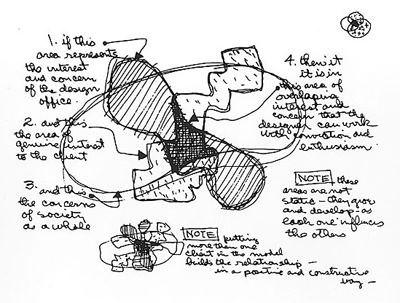
Found this while surfing around this morning, the classic Eames venn diagram illustrating the areas of intersecting concerns when solving a design problem: the client, the design office, and society as a whole. Of course this can be broken down even further into sub-compartments or nested “venns”. But at even this high level it’s quite compelling.

eamesdiagramofdesign.png

Of particular note are the two “notes” saying “these areas are not static–they grow and develop as each one influences the others”, and that “adding more clients add to the relationship in a positive and constructive way”. A very hopeful statement of the ecological nature of design situations and the elements therein, not as distracting adversaries but as cooperative engagements.

Some personal design lessons/axioms

If someone asked me to extemporaneously itemize some personally developed axioms (or “pearls of wisdom”) for practicing interaction design, here’s what I would say:

1. Always question and verify your assumptions, dependencies, and expectations about the project, problem, and client.

2. The three duties of a designer: advocate (for the user), educate (the client about design’s value), and facilitate (among PM/Engin/QA/Doc, etc. to ensure an agreed, consistent design decisions)…and of course create!

3. Useful, usable, desirable –> People, context, content, behavior –> goals/tasks/values (keep these in mind when possible)

4. All design is political because of scope, schedule, budget, resources and competing priorities/goals; deal with it, can’t win all the time.

5. Design functions in a crazy chaotic web of influences: marketing, engineering, QA, tech support, doc. Design’s just one piece, but not the only piece. (corollary to above)

6. Asking the right questions early can be more important than coming up with a clever solution. Conversations tend to invite questions, rather than declarations.

7. Same for identifying the right problem to solve…you don’t want to spend 6 weeks solving the wrong problem!

8. Always take user feedback with several grains of salt. And remember: No one asked for the iPhone or Prius or Wii before they were invented! A designer is an informed visionary.

9. Do less better. Remember this when PM/Engin try to cram features upon features into your product design.

12. There’s always a version 2. Plan for a version 3.

13. Beware of edge cases! 80/20 rule, probability trumps possibility.

14. Alot of design is just perceptual tricks to suggest simplicity, ease of use, etc. Perception is reality.

15. Lighten up, it’s just design. We’re not nuclear engineers or brain surgeons :-)