Crafting delight

Recently we’ve been having an internal debate about what it means to “design for delight” — one of the core Citrix design principles being propagated via posters, executive talks, etc. Is delight  the fact that the damn thing just works?(a baseline minimal expectation IMHO that every product should achieve) Or some splashy sparkly pizazz that (over) stimulates the senses? Or something else…? And do these expectations of what is delightful evolve over time as the delight becomes the norm? How does the product adapt accordingly…

In addition, we have a design principle extolling the value of craftsmanship in everything we do, with focused attention upon the tiniest details of a high-quality software product, much like a Stradivarius violin… or the Apple iPhone 4, which itself embodies the solidity and craft of a Braun design, and the values of Dieter Rams with elegance and simplicity of form. Here craft includes the engineering, manufacturing, and software design integratively.

Taken together, I think it’s really about “crafting delight” towards a cohesive, aesthetic engagement that resonates with a person’s goals and values–and exceeds expectations. Also note the “person” should be perceived as “intelligent, yet impatient”, which I’ve heard is the mantra about users popularized at Apple. This means the person, while very busy, still values the little flourishes that accentuate and improve achieving her goal. She is not a simple machine that needs to be spoon-fed rote explicit instructions in brute force style. What matters then, are the visual and behavioral touches that signify care, thoughtfulness, and a desire to enhance the interaction for everyday convenience and pleasant usage. It’s about subtle poetics, not vibrant spectacle. Not the big splashy thing, which may be fun for the initial encounter to spark up the tone. But for daily utility amid the tedium of work at the office, and so forth. What are those little surprises that make the user say “That’s nice”, “Thank you”, and “Of course”? Instead of slow painful death by a thousand cuts it’s for long-term satisfaction (and brand loyalty!) by a thousand little delights that take the user beyond the functional baseline.

This site features a nice catalog of tiny touches in software interfaces that make things just a bit more convenient, communicative, useful, and just plain delightful to use: http://littlebigdetails.com/

And in terms of crafting interaction design, which is to say behavior, this site has a a couple very detailed stories of how behavior can be artfully designed to help a user be productive, efficient, and happy: http://www.theinvisibl.com/

Thinking about what exactly happens at which period in time and at what state and defining the rules around that is what I’ve often called “nuts-and-bolts” interaction design. Sounds very tedious, yet it’s quite critical. Coupled with exquisite visual design, this is really what makes a product become much more than a mere tool but a valued companion incorporated into a person’s lifestyle and workstyle, the daily habits of activity.


Qualities of a mobile designer

Related to my prior post suggesting that we are all mobile designers now, just wanted to clarify what those qualities are. Of course the assumption is that ultimately mobile will become a normal, pervasive, and de facto situation, so we’re all just designers solving for mobile contexts like any other day. Mobile no longer becomes special. But there are still certain qualities necessary to be successful in this arena.

– Must be up-to-date on the latest devices and functionality and services! Just like any designer, need to be aware of what’s happening in the tech sector and pop culture arena. Gotta be clued into emerging trends with insights from Forrester, O’Reilly, etc.

– Sensitivity to dynamic contexts of use and how they shape usage and needs: basically knowing that this app will be used in a loud coffee shop while waiting for a latte or at the hectic airport in the lounge while waiting to board, not just chained to a desk for 8 hours. (like designing for an intensive desktop app)

– Awareness of different UI models and patterns for device form factors: small, medium, and large. How do notifications appear on each, or text input fields, and the  touch targets and motor skills possible and needed for varying sizes. The UI model of a 10″ tablet app may not be the same as a 3″ phone.

– An ecosystem mentality to designing the application/service across multiple devices and within devices (iPhone + iPad + Macbook, for instance). How does an interface carry across? How can one device control another?

– A well-coordinated, balanced approach to consistency of visuals/behaviors/language across different platforms/devices/interface constraints and forms.

– Cognizant of overall framework of Activity > Experience > Value, not just shoehorning a web or desktop app into various UI form factors, but really thinking through (and making real in the UI) the mobile app value–what’s appropriate, sensible, desirable, and delightful?

And of course there is an array of tactical skills with deep mastery of platform limitations and affordances, emulators and toolkits, slicing up graphics per resolutions, etc. But all that is for nought without a baseline of broader, holistic mobile-oriented qualifications. Again, the expectation is that this becomes the new normal for all designers as mobile becomes a de facto lifestyle, like the web.


Scopes of consistency

What does it meant to be “consistent”? As I noted in a conf call last week with a VP of Prod Mgmnt, this can be a tricky, even dangerous word to use with certain audiences (ahem) like engineers who take it extremely literally. Yet this word gets thrown about a lot when talking about a “good design”, like a natural reflex. In our internal mobile UX summit last week, this issue emerged again in the context of designing a “consistent experience” across multiple devices by various vendors featuring different OS’s (Android vs iPhone vs Blackberry, for example). This raised in my mind the need to clarify this critical word, in terms of “scoping the level of consistency”.

First at a high level, I would suggest that “consistency” does NOT mean reckless cookie-cutter carbon copying of an element all over the place. Instead, to be properly, smartly consistent you must consider the context of use, and what is appropriate: visually, behaviorally, and linguistically (for terminology matters like labels and tip text) It’s like the difference between the rote memorization of a speech versus the rhetorical nuancing of an argument. It involves an art and balance of tradeoffs that requires deliberation among expert peers (and validation with users).

Digging deeper, there seem to be certain “scopes” of being consistent as well:

– Consistency with a visual design system such as Apple Aqua or Adobe Aeon or Microsoft Aero. At Citrix we have a system called Symphony that is a unique Citrix-branded look-and-feel with certain colors and type styles, per our brand.

– Consistency within a particular platform OS, such as iOS or Android or Blackberry which handle notifications and touch gestures in slightly different ways, as part of their “worldview”. When a user buys an Android device, she is buying into that worldview and all its joys and quirks. Ditto for other mobile platforms. In other words, “When in Rome…do as the Romans do” :-)

– Consistency within your product, regardless of platform or visual design system, declaring this is the way this product behavior works period.

Yet I have no answers :-) I am still not sure what the proper precedence level is among these scopes–it likely varies across teams and companies–but at least identifying them (and sussing out the critical threads that connect product designs together) will enable a productive debate about what’s truly most important and how to achieve a family feel.

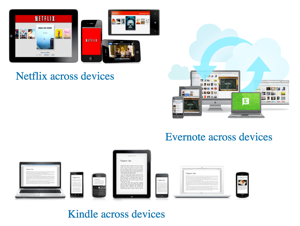
At the end of the day, this is what matters–the voice of the products and their consistency in speaking a cohesive, balanced, persuasive tone to the target audience to encourage a positive experience overall. Evernote, Netflix, Dropbox, and Kindle Reader App all do this very well, as shown below:

cross_device_heroes.png

And in doing so, achieving and persisting an almost intuitive sense of design integrity that is deeper than surface styles, but how much of a family relationship there is among the offerings. Kinda like “blood is thicker than water” ;-) That’s what consistency is all about.

Making Agile work with design

I’ve been meaning to write about my own experience with Agile for a long time! Such a persistently hot topic in design circles. After a great happy hour discussion with our peer Citrix Online designers–who function in a total Agile-driven enviro in Santa Barbara–I decided to share some thoughts from my previous Agile engagement.

** First it’s vital to understand that Agile is a development methodology for programmers, not a “user experience” model for designers. It was meant to achieve efficiencies in producing code as PM requirements change (which they inevitably do). It introduces the concept of “code iteration” and rapid collaboration on the fly–among programmers. That’s it. It’s not a panacea or a magic solution to everyone’s “lack of innovation” problems. Agile won’t give you an iPod. Agile won’t make your company the next Apple. Sorry.

Now that we’ve addressed that point, the big challenge is how to fit design into the often brutally short time cycles (sprints) and influence the stories (dev focus areas). Here’s what we did at Involution Studios with Andrei Herasimchuk when we were hired by a small software company called Agile Software (I know, it’s confusing :-) to help re-invent a product lifecycle management application from a visual, navigational, and behavioral POV with fully built prototypes and finished code.

1. Everyone was co-located into the same physical area. This included the Agile scrum-master, product manager, developers, tech writer, and designers. There were a few folks in India but the company flew out folks for several weeks at a time so that at some point everyone saw each other at least once a quarter for a sustained time period.

Being physically together is so critical to improved collaboration, communication, clearing up mis-understandings, whiteboarding on the fly, and of course, social bonding. Great teams require great chemistry, and knowing how to tap into each other’s rhythms. Also being together forced us to view the story list together, burndown charts, etc. Everyone is alert, focused, and “on-notice” in a sense. Overall just creates a nice vibe of being a true team with a common cause.

2. PMs and Dev leads were forced to learn Photoshop and create some mockups. No joke. Andrei had everyone commit to using Photoshop as the tool of choice for producing crisp pixel-accurate comps and final visual assets. This was decided upfront to eliminate ambiguity and mixing of file types, etc. Want good design? Gotta establish clear tools! In addition the non-design folks (lead PM and Devs) had to learn the tool to empathize with the issues of, say, making an icon or adjusting a layout so they realized how difficult it can be and the levels of impact.

Key Benefits: We never heard “can you just make a quick icon” ever. PM/Dev leads adjusted the stories and sprint cycles in recognition of the design time required for research / exploration / iteration / production. A far more sane, productive sprint cycle overall for designers and devs too. A happier collaborative effort overall. No feelings of being shoehorned into code-centric cycles.

3. Designers tried to stay ahead of the dev stories. This was key too, getting the designers ahead of the devs, to keep iterating on designs and buy time for exploration. Else the result would’ve been the force-fitting that drives designers crazy! More appreciation across the team for a continuous design process too.

4. Revisiting designs were part of the process. Everyone on the team recognized the need for revisiting designs as needed, per feedback internally or from informal user validation studies. This was factored in where possible, again thanks to that empathy for design fostered in PM and Dev leads.

5. Everyone was co-located in the same area :-) Just to iterate that point. It’s a HUGE benefit to have everyone in the same place talking and sharing and arguing and sketching together (at least ambiently aware what’s going on).

6. We had lunches together. Sounds very minor but it’s actually a positive social bonding element. Builds up the team chemistry and of course, those “water cooler” chats about design and dev problems, in a less intense situation. Openness of discussion in a non-threatening context is key! The sprints are intense periods of activity, so you need those down moments of casual conversation for what really matters.

7. We shared research findings and user validation results at our stand-ups and factored them into the stories, design changes, etc. So there was total visibility to everyone of what’s going on from that side of the project and it was given the appropriate level of importance, at stand-up calls.

We’re all mobile designers now

Having just completed a week-long internal design summit on mobile UX–and attended a very timely talk by Rachel Hinman— it’s become very clear to me that we are ALL in effect mobile designers now, or certainly within the next 2-3 years! Designing for mobile device UI is becoming the “new normal” for a variety of reasons as I see it:

• The rapid proliferation of mobile devices (phones and tablets and e-readers) among consumer and enterprise audiences…and don’t forget: TV’s at home, in-car GPS and telematics, kitchen appliances, thermostats, exercise devices, health/medical monitors, etc. The CES 2011 show unveiled over 80+ tablets from various vendors–they’re multiplying like rabbits :-) Yikes!

• The fact is every business is thinking (or freaking out :-) how to get on the mobile bandwagon with a version of their apps on iPhone/iPad, Android, and soon Blackberry and WebOS devices. (not to mention Windows 7 Mobile too!) Mobility is becoming the top strategic priority for firms, getting their apps on respective App Stores…kinda like how everyone just had to have a website 15 yrs ago :-) Funny how history repeats itself.

* Thankfully we have folks like Rachel and Luke Wroblewski to help illuminate the path towards good mobile design. LukeW’s presentation and argument for a “mobile first” strategy in particular is of note, focusing on the need to get ahead of the mobile curve which has positive impact on the software UI design itself–simplicity, focused feature set, clarity of functions–which hopefully rebounds back to the “full app” too.

• Cloud is hot. Yes, it’s the vague internet buzzword du jour–misappropriated in those lame Microsoft ads–but as Joe Biden would say, it’s a pretty “big eff’ing deal” l in which apps/data/settings/profiles are hosted “off-premise” or “out there” for access from any device, any place, any time for “on-demand” use…Just think of Google Mail, Docs, Apps. Amazon web services. Mobile Me. Salesforce. XenDesktop. etc, etc.

• Mobile lifestyles are becoming the norm with workshifting paradigms and emerging device-friendly generation uptaking these new offerings (Gen Y, Millenials, etc). From texting to checking-in to social networking on the go among a range of contexts: in the car, at the airport, on the plane, at a cafe, at the doctor’s office, etc. This is the new normal! As a result as designers we have to be mindful of dynamic environments of use–spatially, temporally, sonically, etc.

• On a related note, waiting is the new context to optimize for. Think about all the situations where you are waiting for something–at the grocery store, doctor’s office, DMV line, jury duty, car repair shop, etc. Combine this with the “need” (ha!) to be connected and productive somehow all the time…reaching for that phone/tablet/e-reader is almost second-nature! How this impacts our attitudes for a work/life balance and reading habits is a whole other discussion and blog post ;-) hint: the attention structures are rapidly changing, becoming more “chunked” and “modular” and “across-device”…hmm!

As a result of all this, UI designers today need to start naturally thinking in terms of cross-device mobile ecosystems for their interface designs: desktop > web > device > and back again. Functions and content should be optimized for the device being used, for the situations likely to be encountered yet retain a sense of ubiquity, fluidity, and of course brand personality that defines the entire mobile ecosystem of interfaces as an integrative aesthetic experience. Whew!

And also…at a technical level the big challenge is how to leverage your interface designs across devices and surfaces of varying resolutions (pixel density) without quite literally going insane! Optimizing tools, processes, templates with engineering teams will be key.

Indeed we are all now mobile designers who must contend with varieties of interface form factors and contexts. It’s simply inevitable and expected. So either get busy designing or get busy denying. But it’s happening :-)

Â